Showing posts with label CANVA. Show all posts

Monday, October 18, 2021

Canva Launches Video Suite to Empower Everyone to Create, Edit and Record Stunning Videos

CANVA VIDEO SUITE

MANILA, PhilippinesCanva, the visual communications platform, today launched Canva Video Suite, an end-to-end video creation product that empowers everyone to design and publish professional-quality videos. Available for free on the web, desktop, and mobile, Canva combines intuitive editing, recording, and collaboration features, thousands of customizable video templates, and an extensive media library in one easy-to-use platform. 

“One of Canva’s guiding principles is to make complex things simple, and our new Video Suite will allow everyone to unlock the power of video, whether that’s to market their business, make engaging social posts, or express their creativity,” said Rob Kawalsky, Head of Product at Canva. “Video is increasingly important in the workplace and online, but traditional tools have been too difficult, expensive, or limited for most to use. Almost everyone creates visual content in today’s world, and we have re-imagined video creation and editing to meet this reality.” 

“Filipinos are highly engaged online and one of the formats that they respond to the most is videos. The launch of Canva Video Suite will enable more Filipino content creators — whether they’re pros who want to up their game on video creation, teachers who are preparing new learning materials for their classes, or entrepreneurs doing a demo of their new products —  Canva is here to make video editing easier and more fun for everyone,” said Yani Hornilla-Donato, Country Manager, Canva Philippines. 


Intuitive Video Editing and Recording for Everyone

Canva makes it simple to get started on almost any type of video for work or play, offering templates that span online platforms like TikTok Ads, YouTube Sets, workplace and business videos, plus fun templates for Halloween, New Year, and other celebrations. Anyone can easily create and customize videos with new features that include:

  • Scene-Based Editor: Canva simplifies video creation with a scene-based approach that feels familiar to building presentation slides, to eliminate the learning curve.

  • Single Layer Timeline on Desktop and Mobile: Scenes can easily be re-ordered, lengthened, or split using the timeline, to turn individual scenes into a story. Cinematic transitions enable a perfect flow between segments, and editing is optimized for mobile apps and browsers, removing the need for powerful hardware.

  • Multiple Audio Tracks: the video timeline now supports multiple audio tracks, whether uploaded to Canva or dragged from the media library, to enhance videos with music, sound effects, and narration. Canva Pro subscribers can access 27,000 royalty-free tracks through a partnership with Epidemic Sound, with thousands of new sound effects set to be available in November. 

  • Screen and Camera Recording: users can now record footage from a camera, screen, or Chrome tab, perfect for video messages and tutorials. 

  • Animation Combinations: Choose from an updated selection of animations to transform text, visual elements, or full pages, in a few simple actions. Animation Combinations, set to be launched in the coming weeks, will apply context-specific animations to every element in a scene at once, for the perfect balance. 


Streamlining the Video Creation Process

According to a recent study by Canva, 68% say that video is becoming more important in the workplace, and 53% of workplace teams have created video content in the past 18 months. Canva streamlines group video projects with real-time collaboration, allowing team members to add comments, assign actions, and work on the same scenes simultaneously. 

Pro and Enterprise customers can manage logos and fonts through Canva Brand Kits that help everyone create on-brand content every time. Instant Styles and Themes allow brand colors to be applied to any video template in a couple of clicks, and Magic Resize means videos can be reformatted instantly — making it easy to convert between platforms, like a YouTube Ad to a TikTok post, without starting from scratch. 


A Full End to End Visual Communications Platform

Canva Video Suite is part of the free visual communications platform that already offers thousands of templates across over 100 different design formats, from presentations to infographics, posters, social media posts, videos, flyers, business cards, letterheads, and much more, plus a media library of hundreds of thousands of assets that span graphics, photos, audio, and stock video. Canva Pro customers gain access to premium features, including a content library of over 100 million assets, over 610,000 premium templates, social media scheduling, Background Remover, Magic Resize, multiple Brand Kits, and more. 

For more information on how you can embrace the future of visual communication, visit Canva.com.


Monday, October 11, 2021

Canva Makes Virtual Learning More Fun and Interactive with Canva Eskwela

CANVA ESKWELA

Manila, Philippines – As Filipino teachers and students kick off yet another school year in virtual classrooms, online design platform Canva offers resources to make learning and interacting more engaging this back-to-school season with Canva Eskwela.

For many Filipino teachers, connecting with their students has become extra challenging with the absence of physical interaction, making learners more prone to fatigue and lack of focus. With Canva Eskwela, teachers can create fun and compelling presentations as well as activities to encourage more lively class discussions.

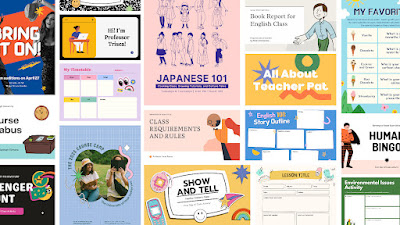
The Canva Eskwela page  features free and visually engaging content especially tailored for educators and learners in the Philippines: from desktop organizers and lesson plan templates, to presentations and ice breakers to make virtual classes more interactive and fun.

“Through Canva Eskwela, we want to express our deep appreciation for our teachers and students who push themselves to teach and learn as we navigate the new normal. We know it is especially challenging for our teachers to reach out to students and inspire them to get excited about school while we continue to hold classes online,” expressed Canva Country Manager Yani Hornilla-Donato. “We want to support them through locally relevant digital education resources that they can easily access for free.”

Canva is known for being user-friendly and accessible even to those with no design background and it is even more convenient for educators to create content from scratch with Canva Eskwela so they can save time and focus on other tasks.

With Canva for Education, students and teachers can also access easy-to-learn resources such as videos and audio recordings that contain tips and guides on designing their materials. Teachers can also find a community where they can share stories and best practices and support one another on the Canva for Filipino Teachers Facebook group.

To sign up for Canva Eskwela for FREE, go to www.canva.com/education/canva-eskwela/.


###


ABOUT CANVA

Launched in 2013, Canva is an intuitive online design and publishing platform with a mission to empower everyone in the world to design anything and publish anywhere. Featuring a simple drag-and-drop user interface and a vast library of templates ranging from presentations, social media posts, posters, invitations to resumes, a huge collection of stock photography, illustrations and fonts, anyone can take an idea and create something beautiful. Canva is available on web, iOS and Android.


Tuesday, September 28, 2021

Canva Offers Jobseekers a Headstart with Easy CV Templates

CANVA CV

Manila, Philippines — The first step to applying for a job is to submit a CV, a snapshot of a job seeker’s background and skills that will serve as a reference for employers to see if an applicant is the right fit for their organization. At this stage in a competitive job market, it is important to have a CV that stands out and presents your qualifications and accomplishments in a creative way. 

Canva, the leading intuitive online design and publishing platform, wants to empower jobseekers by providing ready-to-use templates that can help their application get noticed. There are many designs to choose from to make sure that your CV looks polished and presentable.

With Canva’s suite of tools, you can make your CV both striking and professional looking. There are templates that can let you stand out with a pop of color, help you highlight your important details such as academic achievements or extra-curricular projects through font choices, or even present your CV in a 3D effect. All you need to do is to pick the design that you think best represents you.    

“When applying for a job, first impressions are important. In an increasingly visual era, a great resume or CV makes you stand out, get interviewed, and ultimately land the job of your dreams.  Canva’s resume templates are easy to use and can be customized to reflect your skills, values, personality and creativity. We have world-class talent in this country, and with our platform, we want to help Filipino jobseekers get a headstart with their careers. Canva’s templates provide design solutions for every milestone, because we believe that whatever creative needs you may have, Kaya sa Canva,” says Yani Hornilla-Donato, Canva Philippines Country Manager.

With a catalogue of thousands of design options, Canva makes it easy to design inspiring and engaging content, helping you to achieve your personal and professional goals at any stage of your career. Whether you are a fresh graduate looking for your first job, a seasoned professional looking for your next step up the career ladder, or an entrepreneur presenting your business idea to potential clients, Canva has many user-friendly features that can help you get noticed.

Canva helps to make the creative process easier for any design-related task, through thousands of templates and images at your disposal so you don’t need to start from scratch. The site is easy to navigate, and you can narrow down your search through keywords and advanced search tools that can quickly pull up your best design suggestions.

Explore the site through https://www.canva.com/resumes/templates/ and find the CV template that best represents you. Build your confidence as you create a resume that highlights what makes you hireable, and take that important first step towards your dream job.


###


ABOUT CANVA

Launched in 2013, Canva is an intuitive online design and publishing platform with a mission to empower everyone in the world to design anything and publish anywhere. Featuring a simple drag-and-drop user interface and a vast library of templates ranging from presentations, social media posts, posters, invitations to resumes, a huge collection of stock photography, illustrations and fonts, anyone can take an idea and create something beautiful. Canva is available on web, iOS and Android.